


Money App - Cash Advance
4.22.45K Reviews
App Specs
- Version
- 2.48.0
- Updated On
- License
- Free
- Downloads
- 500,000+
- Developer
- PRG Ventures.
- Categories
- Finance
- Platform
- Android
Screenshots

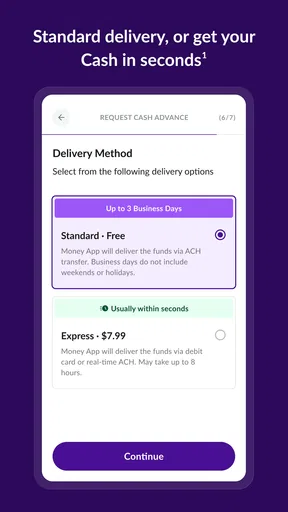
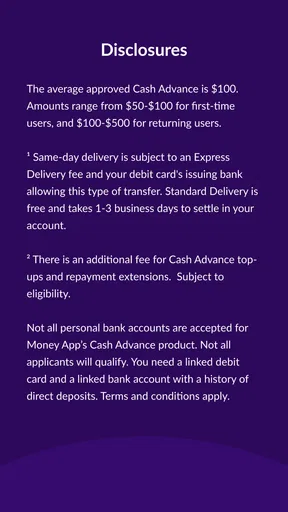

 Analysis by AppCompare
When an expense lands between paydays, the tempting question is whether a cash-advance app can help without making next month harder. Money App - Cash Advance is aimed at that narrow moment: getting access to a short-term advance rather than managing a full budget or replacing a bank account. I see its potential in specific, time-sensitive situations, but I’d treat it as a backup option, not spare income.
A focused tool for a short-term cash gap
This is a finance app from PRG Ventures, and its basic appeal is easy to understand: if you qualify, you can request money to cover an immediate need and repay it later. It is free to download, rated for everyone, and has an average rating of 4.0 from around 8,700 ratings. Those figures offer a little context about its reach, but they don’t tell me whether an advance will suit any particular person. Eligibility and the terms shown to you matter more than popularity.
The app’s current version is 2.41.1. That gives existing users a concrete version reference when checking whether their installation is current, but a version number alone does not reveal what changed or guarantee that every user sees the same experience. The app first appeared in February 2024, so it is a relatively recent product rather than a long-established financial service. I would approach it with the same care I’d use for any newer app that connects to financial information.
What the advance workflow means in practice
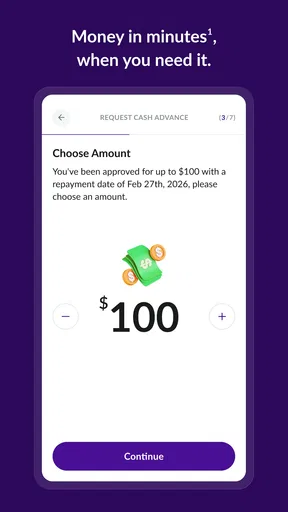
The published experience centers on connecting a bank account, checking the amount available to you, and deciding whether to request an advance. That sequence is more useful than a vague promise of quick cash because it gives you a chance to review the offer before committing. I’d pause at that point and look carefully at the amount, any charges, and the repayment timing displayed in the app. If any of those details do not fit your budget, not taking the advance is a valid choice.
A practical use case might be a necessary car repair that cannot wait until payday. Before accepting money, I’d compare the amount needed with the amount offered and borrow only what resolves the immediate problem. I’d also check what the scheduled repayment would leave in my account for rent, food, transport, and other bills. That simple check matters: a quick solution today is not helpful if it creates a more serious shortfall later.
Where it fits among financial alternatives
Compared with a traditional personal loan, a cash-advance app is designed for a smaller, more immediate gap and a simpler request process. That convenience can be useful when a lengthy application is impractical, but it does not make an advance automatically cheaper or safer. I would compare the full cost and repayment consequences rather than assuming that an app-based option is the best one just because it feels faster.
If the expense can wait, saving toward it or adjusting the timing of another purchase may be less risky. If it is a bill, contacting the provider to ask about a payment arrangement could be worth trying before borrowing. And if the same shortfall keeps returning every pay cycle, a budgeting conversation with a trusted adviser or a more durable change to expenses and income is likely a better fit than repeatedly reaching for advances.
Worth Reading Before You Choose

EA SPORTS FC Mobile 26 Is a Bigger Football Game, but It Takes Time

Flipboard Shows What News Apps Must Do Beyond the Feed

Switching to Android Auto Means Rethinking Your Driving Routine

Google Calendar Makes a Crowded Week Easier to Manage

Ludo King Makes the Most of the Minutes Between Plans

Baby Panda World Brings Quick Play to Modern Phones, but Its Game Library Feels Busy
What’s the Buzz About Money App - Cash Advance?
First things first, the Money App - Cash Advance is all about giving you that quick financial boost when you need it the most. The concept is pretty straightforward: it provides short-term advances on your paycheck. So, if your car suddenly decides to break down or you’ve got an unexpected bill looming, this app might just be your new best friend.
Downloading the app is a breeze, and the interface? Super user-friendly. I felt like I was chatting with a friend who’s got my back, rather than navigating a complex app. Everything is laid out clearly, making the process of requesting an advance as smooth as possible.
How Does It Work?
Once you’ve installed the app, you’ll need to sync it with your bank account. Now, I know syncing bank details can feel a bit intimidating, but rest assured, the app uses top-notch security measures to protect your information. After setting up, you can easily see what amount you’re eligible for and request an advance with just a few taps.
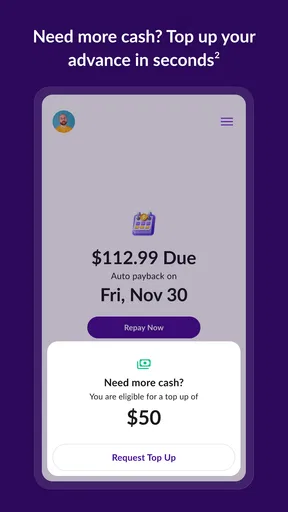
One cool feature I noticed is the transparency. You can see exactly how much you’ll get, any fees involved (which are surprisingly minimal), and when it’ll be deducted from your account. No hidden surprises lurking around the corner!
Why It Might Be Your Go-To App
Let’s face it, traditional loans can be a hassle with all the paperwork and waiting time. The Money App - Cash Advance skips all that. It’s fast, efficient, and straightforward. Plus, it’s like having a safety net for those times when life throws you a curveball.
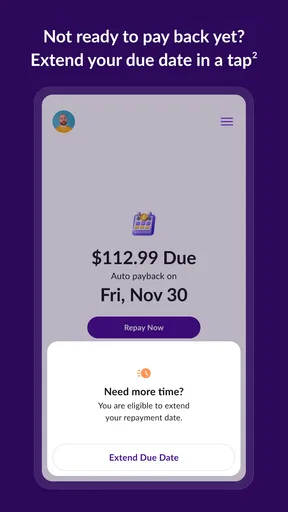
Another thing I appreciated is the flexibility. You’re not locked into a rigid payback schedule. Instead, the app adjusts based on your payday, making it less stressful to manage repayments. It’s like the app is saying, "Hey, we get it. Life happens."
Things to Keep in Mind
While the app is fantastic for quick cash, it’s not a long-term solution. Think of it as a financial Band-Aid rather than a full treatment. It’s perfect for small, immediate needs but not for large expenses or ongoing financial issues.
Also, remember that while the fees are low, they can add up if you’re using the app frequently. It’s best to use it wisely and not as a regular crutch.
Choosing when to use it—and when to walk away
I’d consider this kind of advance when the bill is essential, the timing is genuinely urgent, and I can see a clear route to repaying it from my next income. A one-off expense such as replacing a necessary work item may fit that test better than a discretionary purchase. If the app does not show an amount that covers the immediate need, I would avoid borrowing extra simply because it is available.
Before linking an account, I’d make sure I’m using the official app and read the on-screen explanations about access and repayment. Connecting a financial account is a meaningful trade-off: it may support the app’s assessment and payment process, but it also means I should be comfortable with the permissions and terms presented. I would not enter banking details through a message or an unfamiliar page, and I’d keep my phone’s operating system and app updated.
One useful habit is to note the expected repayment date in the same place I track bills, then plan the rest of that pay period around the reduced balance. I’d also save a copy of the confirmation or transaction details for my own records. These steps do not change the cost of borrowing, but they make it less likely that a repayment catches me off guard or that I forget what I agreed to.
Who is likely to find it useful
The app is most relevant to someone who has a temporary cash-flow mismatch, a predictable incoming paycheck, and enough room in the next budget to repay an advance without missing essentials. It may also suit a person who wants a direct way to review a possible offer before deciding, rather than taking out a larger loan for a small, immediate expense. I would still compare the displayed terms with any other realistic option available to me.
I would skip it if my income is uncertain, if another repayment is already difficult, or if I need ongoing help covering ordinary monthly costs. It is also not a substitute for a lender or financial service designed for a larger, planned expense. An advance can move money forward in time, but it cannot fix a recurring gap between income and bills. In that situation, a payment plan, assistance program, or tailored financial advice may be more appropriate.
Questions worth settling before requesting money
Will everyone receive the same offer? I would not assume so. The useful amount is the one the app actually shows after setup, and it may not match the figure someone else sees. Is the advance free? The app is free to download, but that does not mean every transaction has no cost; I’d read the specific fee and repayment information before confirming. When will repayment happen? I’d use the date shown for my own offer, rather than relying on a general expectation about payday.
What if I change my mind? I’d stop before confirming and review any cancellation or repayment details displayed in the app. What if I need more than a small bridge? I’d compare other options instead of stacking advances or borrowing beyond what I can comfortably repay. These are not minor details: they determine whether convenience actually helps or only shifts pressure into the next pay period.
What to watch as the app develops
Because the app launched in 2024 and is now at version 2.41.1, I’d judge its evolution by practical changes that users can verify in the app itself: clearer explanations of costs, repayment dates that are easy to find, and a straightforward way to review account connections. I would not infer new capabilities from a version number. For existing users, the sensible approach is to check the current screens and terms after an update rather than assume the process has stayed exactly the same.
The same caution applies to security and eligibility. I’d look for plain-language explanations of how bank linking works and what information is needed, then decide whether I’m comfortable proceeding. A polished interface can make a financial decision feel simple, but it should never replace reading the amount, charges, and repayment date. The best improvement an app in this category can make is helping people understand those consequences before they tap to accept.
The Verdict
All in all, the Money App - Cash Advance does exactly what it promises: provides quick cash when you need it without the fuss of traditional loans. It’s intuitive, reliable, and something I’d recommend keeping on your phone for those "just-in-case" moments.
Whether you’re hit with an unexpected expense or you simply need a little extra cash to tide you over until payday, this app could be the financial lifeline you’ve been looking for. Just remember to use it judiciously and enjoy the peace of mind it offers.
Pros
- Easy sign-up process
- Fast approval times
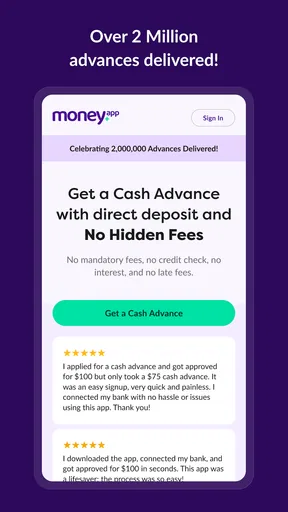
- No hidden fees
- User-friendly interface
- Supports multiple payment methods
Cons
- High interest rates
- Limited to certain regions
- Requires bank account link
- Frequent notifications
- No offline access
FAQs for Money App - Cash Advance
What is Money App - Cash Advance and how does it work?
Money App - Cash Advance is a financial tool designed to provide users with quick cash advances. It works by allowing users to connect their bank account, assess their financial status, and offer a cash advance based on their income and expenses. The app facilitates seamless transactions directly to the user’s bank account.
Is Money App - Cash Advance safe to use?
Yes, Money App - Cash Advance is designed with security in mind. It uses encryption and secure protocols to protect your personal and financial information. Always ensure you download the app from a trusted source and keep your app and device updated to the latest versions for optimal security.
What are the eligibility criteria for a cash advance?
To be eligible for a cash advance through Money App, users typically need to have a regular income and a connected bank account. The app evaluates your financial history and spending habits to determine eligibility and the amount of advance available. Ensure your financial details are accurately represented for the best assessment.
Are there any fees associated with using Money App - Cash Advance?
While Money App - Cash Advance may not charge interest like traditional loans, there might be service fees associated with the advance. It's crucial to read the terms and conditions within the app to understand any potential fees or charges, ensuring transparency and avoiding unexpected costs.
How quickly can I receive funds from Money App - Cash Advance?
Once approved, funds from Money App - Cash Advance can typically be deposited into your bank account within one to two business days. The exact timing can vary based on your bank’s processing times. Always check the app for updates on your transaction status to stay informed.


